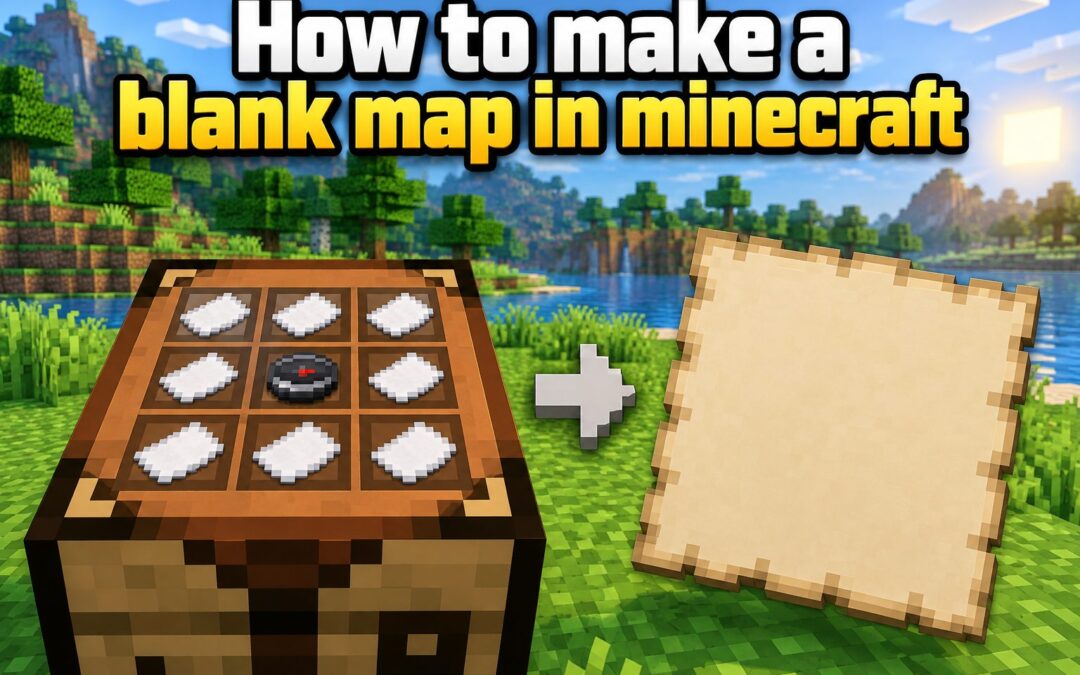
Learning how to make a blank map in Minecraft is useful whenever you want to explore unfamiliar land, record important locations, or build a large map wall. A blank map is an unused map item that has not yet captured any terrain. Once activated, it begins displaying the area around your character from a top-down view. The exact recipe and item name can differ slightly between Java Edition and Bedrock Edition, which often causes confusion for new players. You may need paper, a compass, a crafting table, or a combination of these materials depending on the version you play. This guide explains the recipes, required resources, activation process, map scaling, and important edition differences. You will also learn how to copy maps, organize explored areas, avoid common mistakes, and use maps effectively in survival worlds, multiplayer servers, and creative building projects.
What A Blank Minecraft Map Does
A blank map is a craftable navigation item waiting to record terrain. It becomes an active map when you hold and use it in the world.
After activation, the map displays a square area from above. Explored terrain appears in colors representing features such as water, grass, sand, forests, buildings, and mountains.
The map fills gradually as you travel through its covered area. Any unexplored portion remains empty until you visit the corresponding location while carrying the active map.
Maps are especially valuable when exploring far from a base. They provide a visual record of the landscape and make recognizable natural features easier to find again.
A normal map does not automatically show coordinates, routes, or every structure. It records surface terrain, so players must still observe landmarks and plan their journeys carefully.
Materials Needed To Craft A Blank Map
The required ingredients depend on your Minecraft edition and the type of map you want to create.
- Paper: Craft paper by placing three pieces of sugar cane in one horizontal row of a crafting grid.
- Compass: Make a compass with four iron ingots placed around one piece of redstone dust in a crafting table.
- Crafting Table: Java Edition requires the larger crafting grid because its standard map recipe uses all nine slots.
- Sugar Cane: Look beside rivers, lakes, oceans, and other water sources when gathering the main material for paper.
- Iron And Redstone: Mine underground to obtain the ingredients needed for a compass and a player-position marker.
How To Make A Blank Map In Java Edition
Java Edition uses paper and a compass to produce an empty map that can display the player’s position.
1. Collect Nine Pieces Of Sugar Cane
You need eight sheets of paper for the map recipe, although gathering nine pieces of sugar cane is convenient because each crafting action converts three sugar cane into three sheets. Sugar cane usually grows on dirt or sand directly beside water.
2. Turn Sugar Cane Into Paper
Open a crafting table or your inventory crafting grid and place three sugar cane across a horizontal row. Collect the three resulting sheets of paper. Repeat this process until you have at least eight sheets available for the empty map recipe.
3. Mine Four Iron Ingots
Find iron ore underground or along exposed stone surfaces, mine it with a suitable pickaxe, and smelt the raw iron in a furnace. Four iron ingots are required for the compass, so save them instead of using them for tools or armor.
4. Obtain One Redstone Dust
Redstone ore is normally found deep underground and must be mined with an iron pickaxe or better. You need only one redstone dust for this recipe. Redstone may also appear as loot or become available through trading in some circumstances.
5. Craft A Compass
Use a crafting table and place the redstone dust in the center slot. Put one iron ingot directly above, below, left, and right of it. Move the completed compass into your inventory so it is ready for map crafting.
6. Craft The Empty Map
Place the compass in the center of the crafting table and fill the remaining eight slots with paper. The result is one empty map. Move it into your hotbar, but remember that it will not display terrain until you activate it.
How To Make A Blank Map In Bedrock Edition
Bedrock Edition supports both an empty map without a position marker and an empty locator map that can show player markers.
1. Gather Sugar Cane Near Water
Collect enough sugar cane to make the paper required by your chosen recipe. A basic empty map needs nine sheets, while an empty locator map needs eight sheets and a compass. Growing sugar cane at your base provides a dependable supply.
2. Craft Nine Sheets Of Paper
Place three sugar cane in a horizontal row to receive three sheets of paper. Perform the recipe three times. You can use all nine sheets for a basic map or reserve eight sheets if you intend to add a compass.
3. Choose Your Preferred Map Type
A standard empty map records terrain but does not provide the same player-position features as a locator map. Choose it when resources are limited. Select a locator map when navigation, multiplayer tracking, or finding your position on the map matters.
4. Make A Basic Empty Map
Fill every slot of a crafting table with paper to create an empty map in Bedrock Edition. This is the least expensive option because it requires no iron or redstone, making it useful during the early stages of a survival world.
5. Make An Empty Locator Map
To create an empty locator map, place a compass in the center slot and surround it with eight sheets of paper. Once activated, this version can display a position marker, making it generally more useful for exploration and multiplayer navigation.
6. Use A Cartography Table Option
Bedrock players can also work with maps at a cartography table. Depending on the map and materials placed inside, this workstation can help expand, copy, lock, or add locator functionality, while using fewer materials for certain map operations.
How To Activate A Blank Map
Crafting creates the item, but activation determines which part of the world it records.
1. Travel To The Desired Area
Do not activate the map immediately unless you want it centered on your current region. Carry the blank map to the area you intend to document first. Activation permanently connects it to a particular map grid and dimension.
2. Place The Map In Your Hand
Move the empty map to your hotbar and select its slot. Your character must hold the item before it can be activated. Check the item name first if you are choosing between a normal empty map and a locator version.
3. Use The Map Item
Press the normal use-item control for your platform while holding the blank map. The item changes into an active map and begins recording the surrounding terrain. The exact button depends on whether you use a mouse, controller, or touchscreen.
4. Check Your Position Marker
A locator map should show a marker representing your position and facing direction. If no marker appears, confirm that you crafted the correct map type. Java maps include position tracking, while Bedrock distinguishes basic maps from locator maps.
5. Walk Around To Fill The Map
Move through the covered region while holding the map or keeping it available. New terrain appears as you explore. Traveling along organized rows or around the outer edges first can help you reveal the entire mapped square efficiently.
6. Store The Finished Map Safely
Place valuable maps in a chest, copy them for backup, or display them in item frames. Losing an active map does not erase its recorded data, but replacing the physical item may require crafting and copying from another matching map.
Blank Maps And Locator Maps Compared
The best map choice depends on your edition, resources, and navigation needs.
- Recipe Cost: A basic Bedrock map uses only paper, while a locator map also needs iron and redstone for its compass.
- Position Display: Locator maps show player markers, whereas basic Bedrock maps mainly provide a view of recorded terrain.
- Multiplayer Value: Locator maps can make it easier to monitor participating players within the mapped region.
- Early Survival: A paper-only map is affordable when you have sugar cane but have not yet collected redstone.
- Java Behavior: The standard Java empty map recipe already includes a compass, so the distinction is less complicated.
How To Expand And Copy Minecraft Maps
Map management becomes important when you begin exploring larger regions or sharing information with other players.
- Activate The Original Map: Create its recorded area before attempting to expand or duplicate it.
- Craft A Cartography Table: Combine paper with wooden planks to obtain a workstation designed for map operations.
- Add Paper To Expand It: Place the active map and paper in the cartography table to increase its scale.
- Repeat Scaling Carefully: Each expansion shows a larger area but reduces the visible detail of individual features.
- Add A Blank Map To Copy It: Combine a filled map with an appropriate empty map to create matching copies.
- Use Copies For Multiplayer: Give identical maps to teammates so everyone can reference the same recorded region.
- Keep A Backup: Store one duplicate safely at your base before carrying another copy into dangerous territory.
Practical Uses For Blank Minecraft Maps
Maps solve several navigation and organization problems in survival, creative, and multiplayer worlds.
1. Exploring Beyond Your Base
Activate a map before making a long journey so you can record coastlines, rivers, forests, and other useful landmarks. A locator map helps you monitor your direction and recognize when you are moving beyond the edge of its coverage.
2. Building A Map Wall
Create maps in neighboring regions and place them in item frames arranged on a wall. Properly aligned maps connect into one large world display, giving your base a useful planning center and an attractive record of completed exploration.
3. Planning Roads And Railways
Filled maps reveal the relative positions of settlements, bases, and major terrain obstacles. Use this view to plan efficient roads, Nether connections, boat routes, or railways before spending resources on construction across a long and difficult route.
4. Recording Multiplayer Territory
Players on a shared server can use maps to document towns, claimed regions, trading areas, and community projects. Copies let several players carry the same geographic information, while a protected display can preserve the main map collection at home.
5. Finding Structures Again
Maps do not label most structures automatically, but visible terrain and manually created markers can help you return to villages, monuments, portals, or farms. Record coordinates separately when possible because a map alone may not identify a small structure clearly.
6. Creating Map Art
Advanced builders deliberately place colored blocks across a large flat area so the arrangement appears as artwork on an activated map. A blank map records the completed design, which can then be copied and displayed in item frames elsewhere.
Common Blank Map Mistakes To Avoid
Most map problems come from activating an item too early, using the wrong recipe, or misjudging map coverage.
1. Activating The Map In The Wrong Place
A map follows a fixed regional grid after activation, so opening it at your base may not capture the distant location you intended to record. Travel to the target area first and activate the blank map only after confirming your position.
2. Confusing Java And Bedrock Recipes
Java Edition normally uses eight paper and one compass, while Bedrock Edition can create a basic map from nine paper. Check your edition before crafting so you do not assume that a recipe or position-marker feature works identically everywhere.
3. Expecting A Basic Map To Track You
Bedrock players sometimes craft a paper-only map and expect to see a player marker. For position tracking, create an empty locator map with a compass or upgrade the map through the appropriate cartography process instead of relying on the basic version.
4. Expanding A Map Too Soon
A larger-scale map covers more territory but shows less detail. Expanding immediately can make nearby buildings and terrain features harder to recognize. Keep smaller maps for local navigation and use expanded maps when your priority is regional exploration or planning.
5. Forgetting Dimension Restrictions
A map activated in one dimension is not a reliable general-purpose guide for another. Nether navigation is especially difficult because ordinary map behavior offers limited practical information there. Prepare coordinates, marked routes, and recognizable signs when traveling between dimensions.
6. Carrying The Only Copy Into Danger
Taking your sole map into caves, oceans, or combat creates an unnecessary risk of losing the item. Make a duplicate and store it in a secure chest. You can then replace the traveling copy without repeating the entire exploration process.
Best Practices For Minecraft Map Making
A few consistent habits can turn basic maps into an organized navigation system.
1. Build A Renewable Sugar Cane Farm
Plant sugar cane beside water near your base and harvest it regularly. A steady paper supply supports map crafting, expansion, and copying while also helping with books and rockets. Replant carefully so your farm remains productive after every harvest.
2. Name Important Maps
Use an anvil to give maps descriptive names based on their region or purpose. Labels such as northern village, ocean route, or main base reduce confusion when a chest contains many similar items and make map collections much easier to manage.
3. Keep Map Scales Consistent
Adjacent maps display properly on a wall when they use compatible scales and cover neighboring grid areas. Decide on a scale before creating a large collection. Mixing several zoom levels can produce confusing boundaries and prevent the display from aligning cleanly.
4. Explore In An Organized Pattern
Fill maps systematically rather than wandering randomly. Following the outer border and then moving across the interior in parallel paths reduces missed areas. Boats, horses, elytra, and safe roads can greatly speed up this process in large regions.
5. Carry Supporting Navigation Tools
A map works best alongside coordinates, a compass, marked paths, and recognizable landmarks. Write down important positions when available and carry enough supplies for the journey. Combining several navigation methods protects you when a map is lost or difficult to read.
6. Lock Important Finished Maps
A cartography table can lock a completed map with a glass pane, preventing later terrain changes from altering its display. This is useful for preserving map art, documenting an earlier version of a settlement, or maintaining a stable decorative map wall.
Frequently Asked Questions
1. Why Is My Minecraft Map Blank?
An empty map remains blank until you hold and activate it with the use-item control. An activated map can also contain unexplored areas if you have not traveled through them. Hold the map and move around its covered region to reveal more terrain.
2. Can I Make A Map Without A Compass?
Bedrock Edition allows you to craft a basic empty map using nine sheets of paper and no compass. However, it does not offer the same player-position display as a locator map. Java Edition’s normal empty map recipe requires a compass surrounded by paper.
3. How Do I Turn A Map Into A Locator Map?
In Bedrock Edition, a cartography table can add locator functionality by combining the appropriate map with a compass. Recipes and interfaces may vary by version, so check the resulting item name before completing the operation and carrying it into the world.
4. How Many Times Can A Map Be Expanded?
A standard Minecraft map begins at its smallest scale and can be expanded through several scale levels, up to level four. Each level covers a larger geographic area, but blocks and smaller terrain details become less distinct on the finished display.
5. Can I Reset An Activated Map?
An activated map cannot simply be cleared and assigned to a completely different region. Craft another empty map and activate it in the desired location instead. If you need the same recorded area, create a copy from the existing filled map.
6. Do Maps Work In The Nether And The End?
Maps can be held in other dimensions, but their navigation value differs from normal Overworld use. Nether maps are particularly difficult to use effectively because the position display behaves unusually. Coordinates, pathways, signs, and protected portals are generally more dependable there.
Conclusion
Making a blank map in Minecraft requires paper and, in many cases, a compass. Java players surround a compass with eight sheets of paper, while Bedrock players can choose between a paper-only empty map and a compass-based locator map. After crafting the item, activate it in the region you want to record and explore the surrounding terrain to fill its unexplored areas.
For the best results, choose the correct map type for your edition, activate it carefully, and keep organized copies. Consistent scales, descriptive names, secure backups, and a renewable paper supply will make your maps more useful for exploration, construction planning, multiplayer travel, and large display walls.